This course, titled “Configure provider hours and time off” was part of a “Configuration for Go-Live” learning path I created for TELUS Health.
Impact#
During implementation, customers were struggling with the layered settings and approaches to setting up their schedules. I built this course as part of the initiative to reduce instructor-led hours and increase customer ownership of their domains.
In addition to reducing instructor-led hours for every implementation, the course supported customers making availability changes throughout their time with the software.
The difficulty of choosing between “flex” and “standard” schedules was the core challenge to address. Through mini-challenges and strategic tips, I emphasized the practical scenarios where customers might want to adjust their schedules. This was key because in a vacuum, the different setting options seem similar. However, the impacts on other areas of the system, particularly online booking, were often unknown or intimidating to learners.
In addition to the time and cost savings, learners who completed the course reported that they were confident in their ability to configure their schedule and were motivated to refine their systems using the strategies from the course.
Design Highlights#
The scenario flipcards in the “Choose whether to use standard or flex hours” lesson are one my favourite elements in this course. This choice came up repeatedly in stakeholder interviews as the most difficult aspect of the workflow. The system steps were straightforward and already well documented. It was the decision making behind them that was daunting.
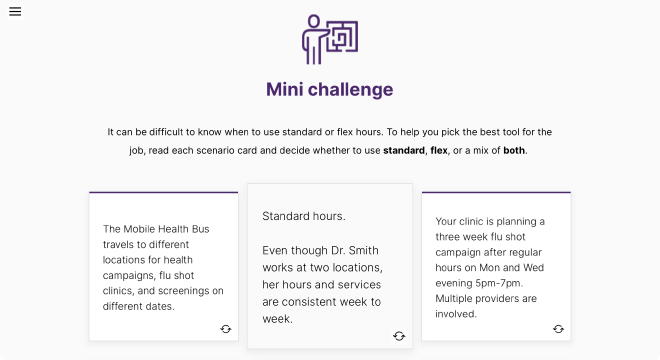
By leveraging a simple interaction tool in Rise, I could emphasize relatable scenarios for the learner that brought the decision making to life. The flip card element allowed learners to challenge themselves safely, and then explore the nuances and impacts of their decisions.
The interactive job aids were also an impactful element that learners and stakeholders called out. The workflow and settings were already well documented, but this course enabled learners to interact with that information in a more contextual way.
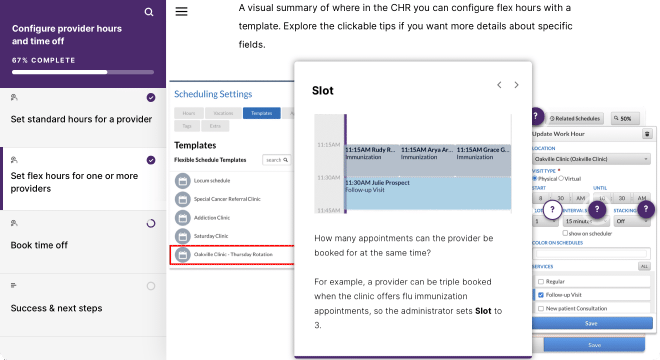
Having tips directly on the UI, as well as providing “what’s in it for me” scenarios in each overlay was another way to bring context and strategy into the course. The job aid format was also great for immediately showing connections to other parts of the system through additional screenshots, helping learners better visualize the impacts of their choices.
Credits#
I designed and produced the course package using Articulate Rise, Camtasia, Vyond, and Figma. I received feedback reviews from my team and stakeholder validation from the implementation department. I did not produce the embedded training videos.